Skip to content
NIOQUICKClarity in Motion
Nioquick Attendance

Clock in by card.
Review every workday.

RFID clock-in, face checks, attendance review and payroll, connected across your branches.

Windows kiosk + web

For HR teams and businesses with people working across branches.

Attendance app icon
Attendance
  1. 01Tap a card
  2. 02Verify the face
  3. 03Review the day
RFID Attendance · 2:50 product walkthrough

A workday, in motion.

Follow a card tap into Punch Log, award a medal and see it at the next check-in.

Follow a workday

Actual product interface · Sample data · Illustrated hardware.

Download video
Read the video transcript

Tap your card on the RFID scanner in front of the computer.

Nioquick checks the enrolled face, then saves the punch with its photo.

Open the dashboard. Once synced, the new check-in appears in Recent Records, ready to review.

Select View on that record to follow it straight into Punch Log.

Filter by date and branch, inspect the capture, and review corrections with supporting evidence and owner approval.

Manage employee profiles, RFID cards, notes, rates and allowances. Keep branches and their records together.

Set shifts, overnight hours, holidays and temporary schedules. Track absence reasons and eligible early starts.

Review actual working time against pay cutoffs, with approval or configured automatic overtime rules.

Follow branch transfers and deliveries, including departure, return, evidence and qualifying travel time.

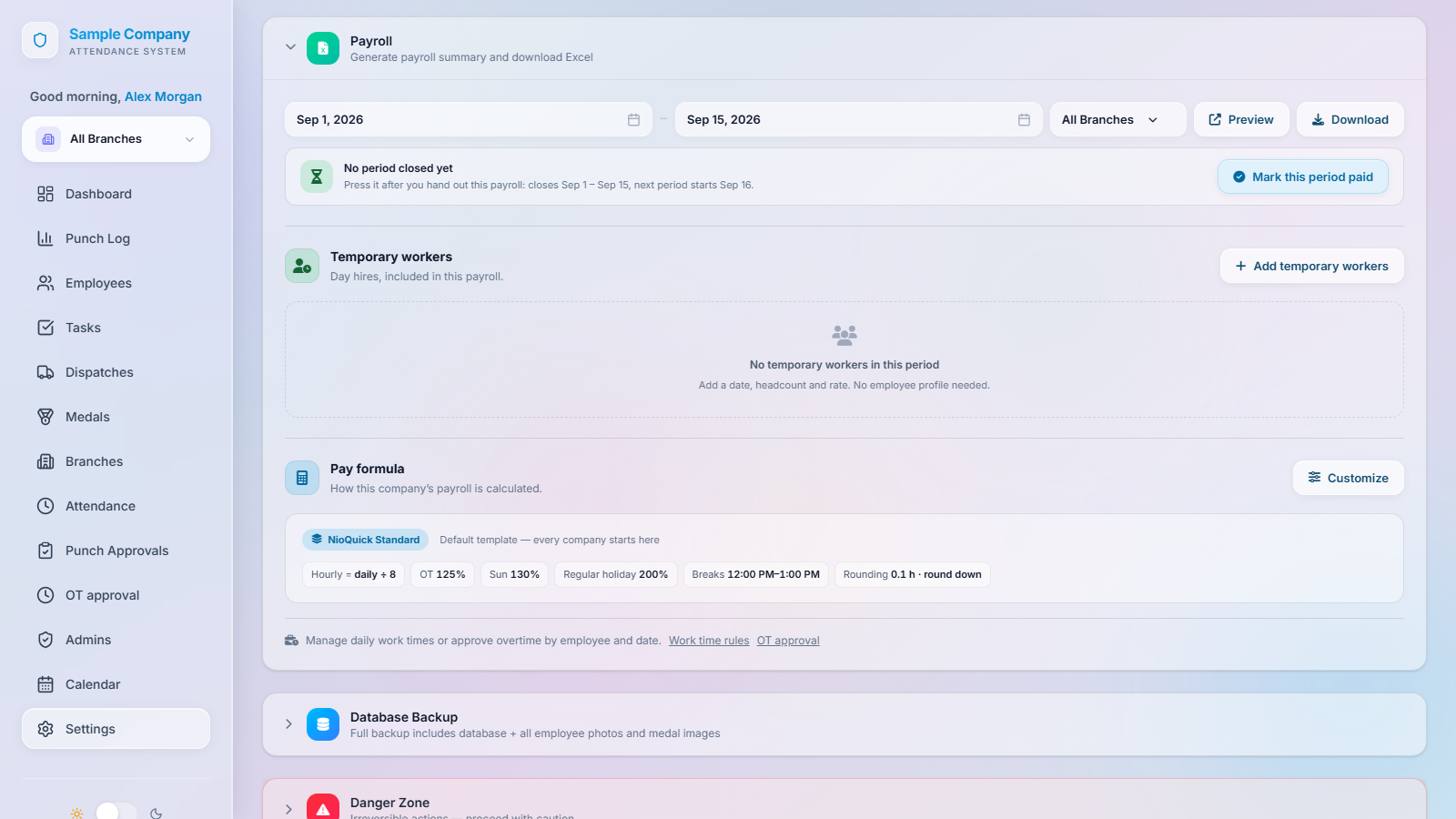
Apply effective-dated payroll rules for breaks, rounding, rest days and holidays. Review allowances and recorded penalties.

Include temporary workers by headcount, rate and hours. Preview payroll, export English or Chinese Excel, and record paid periods.

Facebook Messenger Bot brings attendance updates and announcements into your connected group. Configure the sender, destination and message templates.

Give each administrator the right access. Review activity history and sync logs.

Approve, assign and share kiosks. Check sync, diagnostics and software updates, with restart and shutdown controls.

Manage backups, restore points and retention from Settings.

Recognize a contribution with a medal. Select the employee, choose the medal, and assign it.

After the kiosk syncs the award, the employee checks in. Their new medal appears beside the punch confirmation.

Cardless punching follows the configured checks. Without internet, the powered kiosk saves locally and syncs when the connection returns.

Enabled modules add tasks, checklists, reminders and a read-only AI assistant. Linked administrators can use My Attendance.

Nioquick.

Clarity in Motion.

From the entrance to payroll

Know what happened.
Then prepare the pay.

A missing time-out. A branch transfer. Overtime that still needs approval.

Attendance involves more than a daily total. Nioquick brings the punches, people, work rules and review process together, so your team can check the record behind a pay period.

Inside Nioquick Attendance

See the tools
your team will use.

See the day’s attendance and recent punches across the branches you can access.
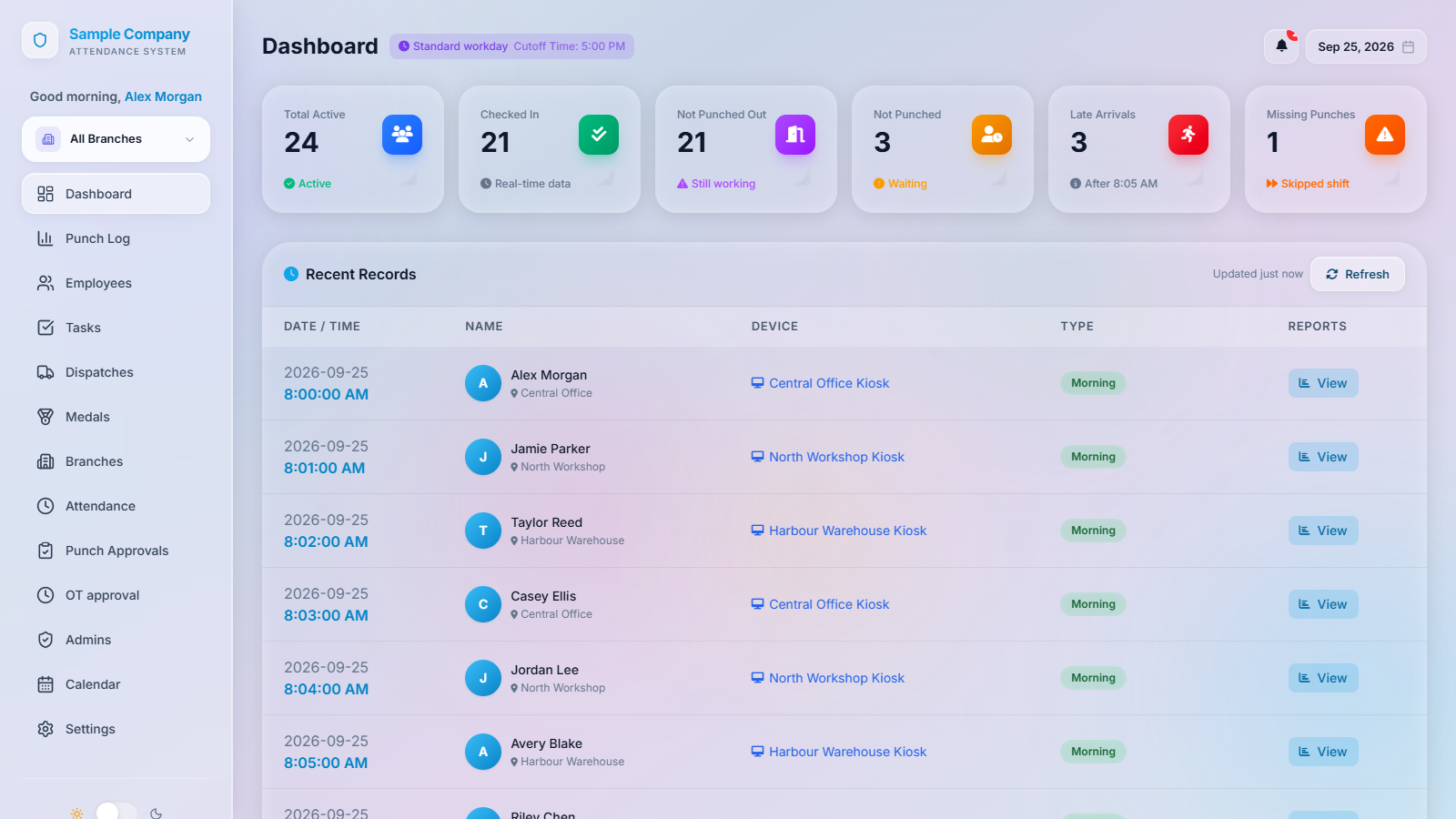
Actual Nioquick Attendance dashboard with attendance counts, branch selection and recent punch records using sample data.
Actual product interface · Sample dataOpen full-size

Tap the screenshot to open it and zoom in.

Follow a workday

One connected workflow.

  1. 01

    Clock in

    The RFID card identifies the employee. The configured face check and punch photo support the record.

  2. 02

    See the working day

    Review punches across permitted branches, together with the employee and schedule.

  3. 03

    Resolve the exceptions

    Check missing punches, submitted corrections, dispatches and overtime approvals.

  4. 04

    Prepare payroll

    Review the period’s hours, rates, allowances and penalties, then download the Excel payroll.

Features at a glance

The tools behind
every working day.

Clock-in

  • RFID & cardless punches
  • Face enrollment & checks
  • Punch times & photos
  • Offline capture & sync
  • Optional anti-spoof screening

Employees & branches

  • Employee profiles & RFID cards
  • Active / inactive status
  • Branch assignments
  • Employee search & notes

Schedules & approvals

  • Dashboard, Punch Log & calendar
  • Shifts, overnight work & holidays
  • Temporary schedules & absences
  • Punch corrections & evidence
  • Overtime & early-start approvals

Payroll & exports

  • Pay formulas, rates & allowances
  • Late fines & penalties
  • Payroll preview & temporary workers
  • Payroll Excel & punch exports
  • Paid-period tracking

Work dispatches

  • Branch transfers & travel time
  • Delivery assignments
  • Departure & return records
  • Delivery overtime review

Team tools

  • Tasks, checklists & reminders
  • Medals & allowance bonuses
  • My Attendance for linked admins
  • Read-only attendance AI assistant

Messenger Bot

  • Automatic attendance messages
  • Message templates & previews
  • Company & branch groups
  • Group announcements
  • Sender status & message history

System management

  • Admin permissions & branch access
  • Activity & sync history
  • Kiosk approval, sharing & support
  • Updates, restarts & shutdowns
  • Backups, restore & photo retention

Some features require setup and permissions.

Is it right for your team?

A kiosk at the door. Records at your desk.

Employees clock in on a Windows PC. Your team reviews attendance in the web dashboard.

At each branch
Compatible Windows PC, RFID reader, employee cards and camera.
For your team
Enrol employees, set schedules and decide who can review records.
When internet drops
The kiosk stores punches locally and syncs after reconnecting. It still needs power.
Pricing

Nioquick Attendance pricing.

Start free with one branch, no credit card needed. Pro is ₱2,499 a month or ₱19,998 a year, with a 7-day free trial on request.

Basic

Free

One branch, no credit card

  • RFID clock-in with face check
  • Keeps working without internet
  • Photo with every accepted punch
  • Attendance dashboard and punch log
  • Schedules, holidays and overtime approval
  • Payroll calculation and Excel export
  • Edit approvals and change history

Pro

₱2,499/month

or ₱19,998/year (save ₱9,990). 7-day free trial on request.

  • Everything in Basic
  • Multiple branches in one dashboard
  • Branch transfers and delivery tracking
  • Team task board
  • Employee medals
  • My Attendance for admins
  • AI assistant for attendance questions
A few practical details

Questions about
Attendance.

What is Nioquick Attendance?
Nioquick Attendance is an RFID attendance system for businesses with one or more branches. Employees tap an RFID card at a Windows kiosk that also checks their face, and managers review attendance and payroll in a web dashboard.
How much does Nioquick Attendance cost?
The Basic plan is free for one branch, with no credit card needed. Pro costs ₱2,499 a month or ₱19,998 a year and adds more branches and extra modules. A 7-day free Pro trial is available on request.
What hardware does the RFID attendance kiosk need?
Each branch needs a Windows PC with a camera, a 13.56 MHz USB RFID card reader and one 13.56 MHz card per employee. The reader plugs in by USB and needs no drivers.
How does Nioquick Attendance prevent buddy punching?
The kiosk compares the face at the camera with the card owner’s enrolled face and refuses the punch if they don’t match. Each accepted punch also keeps a photo that managers can check.
Does the attendance kiosk work without internet?
Yes. The Nioquick kiosk keeps recording punches during an internet outage and uploads them when the connection returns. The PC still needs power.
Can I track attendance across multiple branches?
Yes, on the Pro plan. One web dashboard shows every branch, and each admin sees only the branches they are allowed to manage. The free Basic plan covers one branch.
Does Nioquick Attendance calculate payroll?
Yes, on every plan. It calculates pay from attendance using your rates, overtime rules and holiday calendar, including Philippine holidays, then exports payroll to Excel in English or Chinese.
Who can edit attendance records?
Only admins you authorize. Every change is logged, and records edited by other admins enter payroll only after the owner approves them.
Where do existing customers sign in?
Use RFID Sign in at the top of nioquick.com. If you are already signed in, nioquick.com opens your Attendance dashboard directly.
Get in touch

Let’s look at your attendance process.

Tell us about your branches, shifts and current hardware.